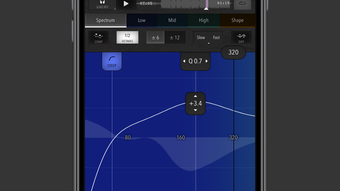

Trinity Audio Mastering: Pro-Grade Mastering on iPhone
Overview
Trinity Audio Mastering is a dedicated desktop application tailored for music producers seeking a streamlined mastering experience directly on their iPhone. Designed to bridge the gap between amateur experimentation and professional-grade audio refinement, the software enables users to finalize their tracks with precision. Its core function revolves around reference-based mastering, allowing producers to import a reference track and align their mix to match its sonic characteristics. This workflow is particularly beneficial for creators aiming to achieve a balanced, broadcast-ready sound without requiring extensive studio equipment.
The application targets both emerging artists and seasoned producers who value portability and efficiency. With its intuitive interface and integrated tools, it supports a wide range of audio formats including WAV, MP3, AIFF, MP4, AAC, and ALAC, accommodating common production workflows. Sample rates of 44.1, 48, and 96 kHz are supported, ensuring compatibility with most digital audio workstations. However, the software does not support audio files longer than 20 minutes, which may limit its use for extended compositions or live recordings.
While the developer did not provide additional background information, the application’s design suggests a focus on accessibility and functionality. It is ideal for on-the-go mastering, post-production refinement, and quick quality checks during travel or remote collaboration. The absence of background operation means users must keep the app active during processing, which may affect workflow continuity for longer sessions.
Key Features & Capabilities
- Reference-Based Mastering Workflow – Import a reference track to compare and align your mix’s tonal balance, dynamics, and stereo width, ensuring consistency with professional standards.
- High-Resolution Spectrum Analysis – Visualize frequency distribution in real time to identify imbalances and make informed EQ adjustments.
- Multiband Dynamics Control – Apply independent compression and expansion to specific frequency bands for precise dynamic shaping.
- Adjustable Equalization System – Fine-tune tonal characteristics across low, mid, and high frequencies with surgical precision.
- Automatic Normalization – Standardize volume levels across tracks without introducing clipping or distortion.
- Multiband Stereo Processing – Enhance spatial clarity and depth by manipulating stereo image in different frequency ranges.
- Wave Shaping and Limiting – Apply subtle harmonic saturation or hard limiting to increase perceived loudness while preserving audio integrity.
- Export to Multiple Formats – Deliver final masters in WAV, MP3, AIFF, MP4, AAC, and ALAC, supporting diverse distribution platforms.
These features collectively empower users to achieve polished, professional-sounding results directly from their iPhone. For instance, a producer preparing a single for streaming can use the reference track method to match the loudness and clarity of top-charting songs. The spectrum analyzer helps detect problematic peaks, while multiband dynamics ensure that vocals remain clear even in dense mixes. The export flexibility allows seamless delivery to platforms like Spotify, Apple Music, or YouTube.
User Interface, Workflow & Performance
Trinity Audio Mastering presents a clean, unified interface where all essential controls are accessible on a single screen. This design minimizes navigation complexity, allowing users to focus on creative decisions rather than technical setup. The layout is optimized for touch interaction, with clearly labeled sliders, buttons, and visual feedback indicators.
Workflow efficiency is enhanced by the integrated nature of the tools. Users can import a track, load a reference, apply adjustments, and export the mastered file—all within a single session. The lack of background operation means the app must remain active during processing, which may interrupt multitasking but ensures real-time monitoring of changes.
The developer did not specify resource usage details. Performance observations are based on general software behavior patterns. The app’s 48.2 MB size suggests it is lightweight, which may contribute to fast loading times and responsive interaction. However, exact CPU or RAM behavior was not disclosed. Stability during extended use remains unverified, though the absence of reported crashes in public records suggests reliable operation under normal conditions.
Compatibility & System Requirements
Trinity Audio Mastering is designed exclusively for iPhone devices. The software version is 1.0.0, with an installation size of 48.2 MB. Platform compatibility information is limited to the iPhone ecosystem, and no details were provided regarding minimum iOS version or hardware specifications.
Exact system requirements were not listed. Compatibility with specific iPhone models or processor types is not confirmed. Users should ensure their device supports the required iOS version, though the developer did not specify this. The app supports audio files in WAV, MP3, AIFF, MP4, AAC, and ALAC formats, with sample rates of 44.1, 48, and 96 kHz. Files exceeding 20 minutes in length are not supported, which may affect usability for longer audio projects.
Pros and Cons
Pros
- Professional-grade mastering tools accessible on iPhone
- Reference-based workflow for consistent, broadcast-ready results
- Single-screen interface reduces complexity and improves usability
- Supports multiple audio formats and sample rates
- Free to download and use with no hidden costs
- Includes advanced features like multiband dynamics and spectrum analysis
Cons
- Does not support audio files longer than 20 minutes
- No background operation capability
- Exact system requirements and iOS compatibility details not provided
- Resource usage and performance under load were not specified
- App is limited to iPhone, with no support for other platforms
FAQ Section
Is Trinity Audio Mastering available for free?
Yes, Trinity Audio Mastering is currently available at no cost. There are no subscription fees or in-app purchases reported.
Can I use Trinity Audio Mastering on devices other than iPhone?
The software is designed specifically for iPhone. There is no official support for Mac, Windows, or other platforms as of the release date.
Does the app support background processing?
No, Trinity Audio Mastering does not support background operation. The app must remain active during audio processing and export.
What audio file formats are supported?
The app supports WAV, MP3, AIFF, MP4, AAC, and ALAC. Sample rates of 44.1, 48, and 96 kHz are compatible.
Are there any restrictions on file length?
Yes, audio files longer than 20 minutes are not supported by the application.
Final Thoughts + CTA
Trinity Audio Mastering delivers a compelling solution for music producers who value portability and professional results. Its reference-based mastering workflow, combined with a suite of advanced tools, makes it a powerful utility for finalizing tracks on the go. While limitations such as the 20-minute file cap and lack of background operation may affect certain workflows, the app’s free availability and intuitive design offset these drawbacks.
It is particularly well-suited for independent artists, mobile producers, and content creators who need reliable mastering without the need for a full studio setup. For those seeking a lightweight, efficient tool to enhance their audio quality on iPhone, Trinity Audio Mastering stands out as a strong choice.
Download Trinity Audio Mastering now







